Roymall Newsletter Subscription Form
Take 20% off your order now - Get early access to deals and sales
Home>mall>Toys Hobbies & Robot
0いいね

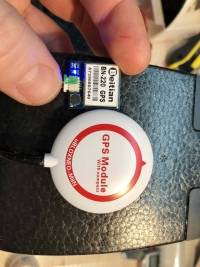
Beitian デュアル BN-220 GPS GLONASS アンテナモジュール TTLレベル RC ドローン飛行機

4.91190
$39.99 /$48.79
  • *Name:

  • *Email:

  • *Phone:

  • *Quantity:

  • *Content:

  • Attachment:

    Supports JPG, JPEG, PNG, PDF, EXCEL, WORD, RAR, ZIP, 7z formats

$12.00 /$48.79
Shipping to: United States | Express delivery: 7-12 business days | Standard delivery: 15-25 business days

安全なチェックアウト

無料ギフト
購入ごとに無料ギフト
配送ポリシー
9.9ドル以上の注文で標準配送無料
返品ポリシー
返品は商品受領日から40日以内に受け付けます。カスタマイズ商品は返品または交換できません。Eギフトカードで購入した商品は交換のみ可能で、返金は適用されません。

無料ギフト

Roymallへようこそ、プレミアムデパートメントストアギフトを購入するための専門ウェブサイトです。私たちはあなたのサポートを高く評価し、感謝の気持ちを込めて、購入ごとに特別な無料ギフトをお届けします。私たちと一緒にショッピングを楽しむことで、ライフスタイルを向上させる高品質な製品を楽しむだけでなく、注文ごとに特別な無料ギフトも受け取ることができます。 私たちのコレクションを探索して、完璧なギフトを見つける準備はできましたか?プレミアムデパートメントストアアイテムのセレクションを閲覧し、注文をして、購入品と一緒に無料ギフトが届くのを楽しみにしてください。

配送ポリシー

注文を受領後、商品を安全にお届けするために努めます。配送詳細は確認メールに記載されます。ほとんどの場合、注文は2日以内に処理されます。特別な状況下では、以下のように遅れることがあります:土曜日、日曜日、または祝日に注文をした場合、2日遅れます。通常、飛行機の遅延やその他の環境要因の影響を受けない場合、5〜7営業日(月曜日から金曜日)かかります。私たちの配送サービスは世界中に及ぶため、配送時間はあなたの場所によって異なります。遠隔地や国の場合は数日かかる場合がありますので、お待ちください。

1. 返品・交換ポリシー

私たちはroymall.comで購入した商品のみ受け付けます。地元のディストリビューターや他の小売店で購入した商品は返品できません。 最終販売商品や無料ギフトは返品できません。返品の対象となるためには、商品は未使用で受け取ったときと同じ状態でなければなりません。また、元のパッケージに入っている必要があります。返品手順を受け取った後、返品商品をパッケージに詰めて地元の郵便局または別の宅配業者に渡してください。
返品または交換商品を受け取った後、3〜5営業日以内に処理します。返金は自動的に元の支払い方法に反映されます。カスタムサイズ、カスタムカラー、カスタムプリントなどのカスタム製品は返品または交換できません。さらにヘルプが必要な場合は、お問い合わせください。 service@roymall.com またはWhatsapp: +447549870296

2.返金ポリシー

返品パッケージを受け取り、確認した後、全額返金または100%ストアクレジットを受け取ります。返金は自動的に元の支払い方法に反映されます。 配送料や関税、手数料は返金対象外です。パッケージが発送された後、追加の配送料は返金できません。これらの費用を支払う責任があり、私たちはそれらを免除または返金することはできません。返品商品を受け取り、確認した後、返品商品を受け取ったことを通知するメールを送信します。また、返金の承認または拒否についても通知します。返金プロセスに関する問題がある場合は、お問い合わせください。 service@roymall.com またはWhatsapp: +447549870296
 
 
Description User Manual
Dimension : 22mm*20mm*6mm
Weight : 5.3g
Connector : 1.00mm spacing between the 4pins patch seat
 
Specification
Electrical Characteristics
Chipset : 8030-KT
Receiving Format : GPS,GLONASS,Galileo,BeiDou,QZSS and SBAS
Frequency : GPS L1,GLONASS L1,BeiDou B1,SBAS L1,Galileo
Channels : 72 Searching Channel
Sensitivity
Tracking : -167dBm
Reacquisition : -160dBm
Cold start : -148dBm
Hot start : -156dBm
Accuracy
Position Horizontal : 2.0 m CEP 2D RMS SBAS Enable (Typical Open Sky)
Rate : 0.1m/sec 95% (SA off)
Timing : 1us synchronized to GPS time
 
Acquisition Time
Cold Start : 26s
Warm start : 25s
Hot start : 1s
 
Data and Update Rate
Support Rate : 4800bps to 921600bps,Default 9600bps
Data Level : TTL or RS-232,Default TTL level
Data Protocol : NMEA-0183 or UBX, Default NMEA-0183
Single GNSS : 1Hz-18Hz
Concurrent GNSS : 1Hz-10Hz,Default 1Hz
 
Operational Limits
Altitude : 50,000m Max
Rate : 515m/s Max
Acceleration : Less than 4g
Power consumption
VCC : DC Voltage 3.0V-5.5V,Typical: 5.0V
Current : Capture 50mA/5.0V
Operating temp :-40 °C ~ +85°C
Storage Temp : -40°C ~ +105°C
 
Indicator :
TX LED:blue.The data output, TX LED flashing
PPS LED:red.PPS LED not bright when GPS not fixed,flashing when fixed
 
Wiring:
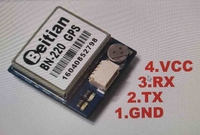
GND,TX output,RX input,VCC(3.0v-5.5v)
 
Package including :
1 x BN-220 GPS Module
2 x 15cm Cable

Beitian デュアル BN-220 GPS GLONASS アンテナモジュール TTLレベル RC ドローン飛行機

Beitian デュアル BN-220 GPS GLONASS アンテナモジュール TTLレベル RC ドローン飛行機

Beitian デュアル BN-220 GPS GLONASS アンテナモジュール TTLレベル RC ドローン飛行機

Beitian デュアル BN-220 GPS GLONASS アンテナモジュール TTLレベル RC ドローン飛行機

Customer Reviews

5.00 out of 5
See all 3945 reviews
Write a Review
  • All Reviews (3945)
  • Image ( 2 )
  • Video (0)
  • All Star
    • All Star(3945)
    • 5 Star (2)
    • 4 Star (0)
    • 3 Star (0)
    • 2 Star (0)
    • 1 Star (0)
Sort by:
Top Review
  • Top Review
  • Most Helpful
  • Most Recent
Reviews only from your country (United States)
|
Show Original

A part of the review has been auto-translated.

  • 28/03/2022

    Producto recibido en tiempo y forma ofertado.
    ⚠️La unidad que me ha llegado no ha traído ningún tipo de documentación de instalación o esquema de conexiones.
    Gracias a los aportes de esquemas de conexión de otras tiendas en la Red, y videoturiales de su instalación y configuración, he conseguido llevar a buen puerto su instalación.
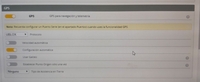
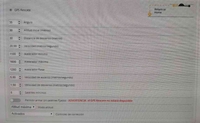
    ℹLas conexiones son las que he dejado en el apartado de fotos. Recordando que la salida de Tx del GPS se conecta al Rx de la placa y el Rx del GPS se conecta al Tx de la placa Fc.
    Se conectan cruzados para que exista la comunicación de lectura y escritura de información entre dispositivos.
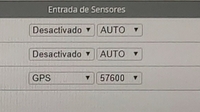
    ✅Tras su conexión a la Fc, hay que dar de alta en Betafligth el sensor, teniendo en cuenta el UART donde se ha conectado, todo esto en la pestaña de puertos.
    Después de activar el tick de GPS en la pestaña de configuración, es interesante definir el servicio en caso de failsafe y poder utilizar también el modo RTH, para que según la información que aporta el GPS, el dron vuelva a su origen de despegue de la forma configurada, tanto altura, velocidad, ángulo de ataque, velocidad de descenso o distancia de aproximación.
    Todas estas opciones, intuitivas en su configuración.
    🟢La primera vez que conectas la antena y lo dejas que busque los satélites para su funcionamiento, el tiempo que emplea en realizar esta tarea puede llegar a ser suficiente como para agotar una batería, hay que tener este tiempo muy en cuenta ya que el dron al estar encendido y no en vuelo, tanto la fc como el vtx acumulan temperatura, pudiendo llegar a ser crítica esta temperatura.
    ‼️Recomiendo encarecidamente, no dejar el equipo desatendido en ningún caso, al igual que ir controlando la temperatura, con el fin de evitar averías accidentales.
    ✅La antena GPS, trae una pequeña batería que se encarga de dar servicio al almacenamiento de localización de los últimos satelites, de esta forma, el tiempo empleado para recuperar los satelites (en futuras conexiones), se ve mermada notablemente👍.
    ⚠️Resulta interesante, que la antena esté en la posición idónea, con el fin de tener acceso directo al cielo, a poder ser, lejos del vtx, Fc o antenas, con el fin de evitar posibles interferencias.

    ⁉️Si este comentario te ha resultado útil, dale un like👍, para poder ayudar a más personas.
    Comments (2)
    Show Original
  • 28/01/2018

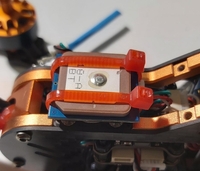
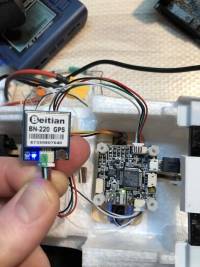
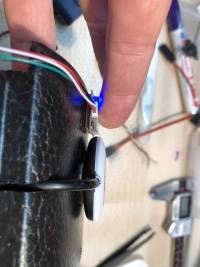
    best value for a small inav compatible gps. even in the house it just takes seconds for gps fix and getting 12satteloites on my test even indoors! Love it. see picture with size comparison to a normal m8n gps disc...
    Comments (0)
    Show Original
Show:
    12...30

    Total 0 pages

    Go to page

    Go
    Customer Q&As
    Can't find your answer? Ask a new questionorCustomer Service

    Tips:For questions about your order, place of delivery, product discount, taxation, delivery time, warranty, shipping, payment, exchange rate, and other questions unrelated to the product, please contact customer service.

    showing 1-30 of 76 |
    Show Original

    A part of the QA has been auto-translated.
    • 0
      Q: Can someone tell me how to install that. I have blue light blinking but nothing happend in cleanflight. What did I fail?
      A:
      You're DONE! Once it sees a satellite, the RED one will strobe also as it adds more satellites.
      Answered by Asus Kybd on 19/04/2019Helpful (0)
    • 0
      Q: What is the difference between this BN-220 and BN-180 type?
      A:
      BN220 is slightly bigger, heavier and expensive than BN180. BN220 has flash memory to store the settings while BN180 doesn't... So BN180 has to be configured every time it's powered on. Usually flight controller software (like Inav) do automatic configuration of GPS module every time it's powered on, so both BN180 and BN220 will work fine.
      Answered by danarrib on 14/06/2019Helpful (0)
    • 0
      Q: Will this work with an OmnibusF4 and betaflight?
      A:
      it does work very well, you have to set baud at 9600 in betaflight. others will not work even its configured with ublox. load default config in ublox and setup your satellite preferences. cold start aprox 1.5min, warm start 10-15seconds. will order a second one. (hobbywing xrotor G1 / Omnibusf4)
      Answered by luckygaz on 28/01/2019Helpful (0)
    • 0
      Q: Can this be used with betaflight?
      A:
      yes
      Answered by samuele08 on 27/03/2022Helpful (0)
    • 0
      Q: Can this be used with ESP8266 / NodeMCU ?
      A:
      I don't know
      Answered by gwend29 on 09/06/2022Helpful (0)
    • 0
      Q: what baud rate in betaflight
      A:
      57600
      Answered by BG414816481 on 26/09/2021Helpful (0)
    • 0
      Q: will this work with F7 flight controllers?
      A:
      Yes,as long as you have an available UART
      Answered by osgav on 08/09/2020Helpful (0)
    • 0
      Q: work with f411 stable?
      A:
      Yes, working just fine.
      Answered by a2j on 19/11/2021Helpful (0)
    • 0
      Q: he said to put in 3.3v putting on 5v will break it... is this true?
      A:
      i put it on 5v gnd uart3 (tx rx) and it works
      Answered by Fabi12345567 on 23/08/2021Helpful (0)
    • 0
      Q: work with crazybee f4?
      A:
      Yesuse Rx and Tx
      Answered by gniiiiiiiiiii on 26/10/2020Helpful (0)
    • 0
      Q: does it work if i mount this under my carbon top plate of my quad?
      A:
      I had to mount it in printed piece outside of my quad because carbon caused perturbations
      Answered by Qleemax on 29/08/2021Helpful (0)
    • 0
      Q: Does it work on Iflight nazgul5 v2 ?
      A:
      it doesn't really depend on the drone on if the GPS will work or not. for this to work you will need: a free UART on your FC - the nazgul v2 comes, as far as i know, with an Succex-e f7 stack, which has at least 4 uarts exposed, as I don't see much periphery that would use one, I would assume that at least one, probably two of those are free. a place where to mount the GPS unit - the backside of this unit is a ceramic antenna, this antenna needs to be mounted on the drone in a way that during regular flight it points upward to the sky without any obstruction, ideally away from other antennas and motors. Keep in mind that your drone when moving is angled, so you want the GPS antenna mounted angled in the opposite direction to flatten out that angle. you then will need to setup your firmware (likely betaflight) to use the GPS, which is a bit of a process, try to find a bardwell video on it.
      Answered by ppetermann on 23/01/2022Helpful (0)
    • 0
      Q: hi will it works with the dji fpv system ? regards
      A:
      Yes it will but I would buy the BN 880. (Gps + Compass) only a a fuw dollar’s more
      Answered by KiwiNP on 10/02/2020Helpful (0)
    • 0
      Q: Dual means gps with compass,? does it comes with inbuilt compass
      A:
      No, there is no compass on this one. BN-8xx series have a compass.
      Answered by gniiiiiiiiiii on 13/11/2020Helpful (0)
    • 0
      Q: Does the BN-220 have a compass? Why is this bigger and heavier than the BN-180?
      A:
      BN-220 don't have a compass, but he is better than BN-180
      Answered by Black_Sapphire on 05/06/2021Helpful (0)
    • 0
      Q: 220 or 220T? what are the differences?
      A:
      Nodifference besides the thickness of the ceramic antenna and higher weight. 5.3g vs 8.3g and 6mm vs 9mm.
      Answered by goku_rc on 23/02/2021Helpful (0)
    • 0
      Q: Is this compatible with Omnibus F4 V3 FC which is on X220s
      A:
      I bought it but I never got to ride it
      Answered by Nando_fpv on 03/07/2022Helpful (0)
    • 0
      Q: I solderd the GPS on RX1-4/TX1-4 and set the betaflight. Every Time GPS false. Why ???
      A:
      Check setup with U-Center.
      Answered by gniiiiiiiiiii on 13/11/2020Helpful (0)
    • 0
      Q: will this work with the spracingf3 board ?
      A:
      Yes
      Answered by a2j on 15/09/2022Helpful (0)
    • 0
      Q: which way is pointing forward?
      A:
      Thereis no compass so this makes no difference.
      Answered by MaltaD0g on 20/09/2021Helpful (0)
    • 0
      Q: can this gps be cibfigured to show the drone distance in the goggles' OSD?
      A:
      ThisGPS can show drone distance (from home) using betaflight or iNav on your drone
      Answered by lacvo on 20/07/2022Helpful (0)
    • 0
      Q: can i use this with skystars turboS f405 ?
      A:
      I don't know
      Answered by gwend29 on 26/03/2022Helpful (0)
    • 0
      Q: what is the baud rate to read data in Arduino?
      A:
      9600
      Answered by zlowmu on 30/04/2020Helpful (0)
    • 0
      Q: компас есть?
      A:
      I don't now
      Answered by Francesco on 01/01/2022Helpful (0)
    • 0
      Q: I got a huge delay/lag/latency of about 5-7 seconds before the gps-data is updated on the OSD. Any ideas?
      A:
      No. Haven't installed it yet.
      Answered by BG492283738 on 27/02/2024Helpful (0)
    • 0
      Q: serve para o eachine E58?
      A:
      yes
      Answered by Kostya on 29/11/2021Helpful (0)
    • 0
      Q: is this M8N?
      A:
      Don't know.
      Answered by BG492283738 on 27/02/2024Helpful (0)
    • 0
      Q: Is the reduced price because on April 6th 2019 it's going to stop working? https://www.theregister.co.uk/2019/02/12/current_gps_epoch_ends/
      A:
      it,sstil work )
      Answered by OlegPavlov on 09/02/2022Helpful (0)
    • 0
      Q: Do this product can be used with APM 2.5.2 and 2.8 and pixhawk?
      A:
      This gps module can be used with every flight controller
      Answered by Loukaskarantinos on 06/01/2022Helpful (0)
    • 0
      Q: why my gps cant detect any signal in outdoor or indoor. i properly install my gps on my flight controller and this is not my firstime installing gps module on flight controller, my only concern is if my flight cotroller support this gps module, thats why cant detect any signal. can any one have same problem on mine? need help
      A:
      Yeah, did ya plug the flight battery in first? It won't work w/o one plugged in!
      Answered by Asus Kybd on 19/04/2019Helpful (0)

    マイカート カート (10540)
    マイお気に入り マイお気に入り (0)

    Roymall Service